Your comments

how come photos are added in the correct order?
15 years ago
Hi Amber,
I’ve just checked the video files and they have no length/size and when I try to play them (on the Mac) they are just a 1s movie. I think that this is the way I exported them. I guess iPhoto exports them as a movie, but just effectively 1 frame of the video almsot like a screen grab...
So,
I then just dragged some videos from iPhoto onto a folder in Finder...
And now they transfer fine!
So many thanks for your help.
Only one problem remains, the videos all end up in the end of the camera roll, as if they’ve just been taken? In finder the creation and modified date is correct (i.e. perhaps a few months ago when I shot the video) , but the transfer app doesn’t recognise this?
Any way of ensuring the video is put back into the camera roll in date order?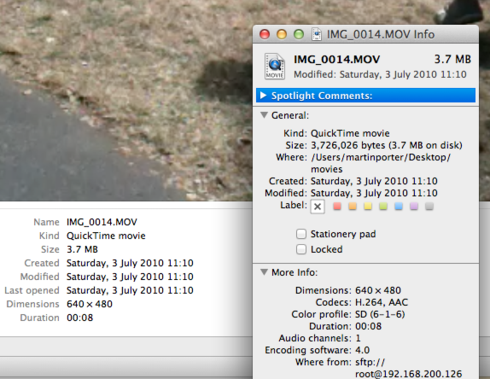
I’ve just checked the video files and they have no length/size and when I try to play them (on the Mac) they are just a 1s movie. I think that this is the way I exported them. I guess iPhoto exports them as a movie, but just effectively 1 frame of the video almsot like a screen grab...
So,
I then just dragged some videos from iPhoto onto a folder in Finder...
And now they transfer fine!
So many thanks for your help.
Only one problem remains, the videos all end up in the end of the camera roll, as if they’ve just been taken? In finder the creation and modified date is correct (i.e. perhaps a few months ago when I shot the video) , but the transfer app doesn’t recognise this?
Any way of ensuring the video is put back into the camera roll in date order?

Customer support service by UserEcho