Your comments

Amber, Thanks I thought that no one was interested in assisting after 3 days went by with no response. I do know what is wrong now and hope there is a work around. I downloaded the app from itunes and my ipad is a first generation so the version I downloaded is an older version. Is there any workaround? What I need is to backup all of the photos on the ipad to my computer. What brought me to purchasing your app is when I direct connect to the ipad with a cable only one folder shows (about 1/6 of my pictures on the drive). Your app shows all pictures and looks like it is connected but won't transfer. Any help or work around you can suggest would be appreciated.
11 years ago
Glad this program was so cheap. Guess you get what you pay for.
Yes. The app does stay open. The folders are showing but no pictures show in the preview area. I just keep getting a gray box that drops down from the top and says check version and reboot router. I have rebooted the router, laptop and device. No change. I have also just downloaded the desktop and iPad software so they must be up-to-date. I have use the web interface with the exact same results.
Changed the ipad name to just pdavis. No change
My ipad is named pdavis' ipad. Don't know if the ' qualifies as a special character but I don;t know why that would make a difference. Here is the screen shot:
![]()
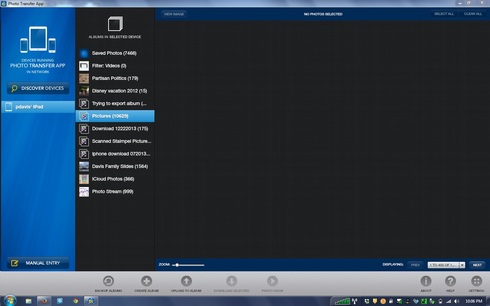 https://d2r1vs3d9006ap.cloudfront.net/s3_images/1177024/RackMultipart20150324-4862-1alx231-Untitled_inline.jpg?1427166687" />
https://d2r1vs3d9006ap.cloudfront.net/s3_images/1177024/RackMultipart20150324-4862-1alx231-Untitled_inline.jpg?1427166687" />Version 4.7. IOS is 5.1.1
The IOS is the latest version the iPad can update to.
The IOS is the latest version the iPad can update to.
Customer support service by UserEcho